Purpose:This demo shows you how to search for peer reviewed articles in EBSCOhost's Academic Search Premier database.
Length: 5 minutes
File format: Video (mp4) -13.5MB (Needs Adobe Flash Player)
Required: Headphones or speakers to hear the audio
Related post: Video: What is a peer reviewed article?.
Related Post: Parts of a Journal Article 
y.y.
Wednesday, September 28, 2011
Video: Finding Peer Reviewed Articles in EBSCOhost
Labels:
User Guides


Sunday, September 25, 2011
Video: What is a peer reviewed article?
Click on the following link to view a narrated PowerPoint presentation on what "peer review" is, what a peer-reviewed journal might include in its content, and what a peer-reviewed article looks like.
Tutorial Link: http://www.screencast.com/t/E9zqSVBqtOd (Click on the "Play" arrow to start the video.)
You need headphones to hear the audio or click on the "cc" button to view the closed captions. You can also click on the forward arrow to skip to the next slide when necessary. Adobe Flash player is required.
Related post: Video: Finding Peer Reviewed Articles in EBSCOhost.
Related Post: Parts of a Journal Article
Labels:
User Guides
Monday, September 5, 2011
ENGL& 235 - Commeree - Periodical Analysis
Types of Periodicals
- Parts of a Research/Scholarly Journal Article - APA Style
- Gaston, M.A. (2005). Become a critical reader. Journal of Dental Hygiene, 79(3), 1. Retrieved from IngentaConnect database.
- This article articulates the benefits of reading peer-reviewed articles, compares them with articles published on trade magazines, and provides tips on critical reading. (Note: it takes some time to load, then you click on "PDF" to read the full text of the article.)
- ProQuest Handout: Scholarly Journals, Trade Publications, and Popular Magazines
- This handout compares the three different types of periodicals in a nice table format with details.
- Video: What is a Peer-Reviewed Article?
- Video: Finding Peer-Reviewed Articles in EBSCOhost
- Peer-Reviewed Article Checklist
Example 1:
- If the title is available through EBSCO, look at the publication
Labels:
Class Topics,
User Guides
Thursday, January 20, 2011
Catalog Tutorial: Subject Search 2, Browse Shelf
Tutorial Direct (Full Size) Link: http://www.screencast.com/t/zRlp3vpRlUF4
1:24 minutes
file format: swf (requires Adobe Flash Player to play)
Transcript:
Another useful way to find books on the same Subject is “Browse
Labels:
Catalog,
User Guides
Friday, January 14, 2011
Catalog Tutorial: Subject Search 1
Tutorial Direct (Full Size) Link: http://www.screencast.com/t/aj5yfq3CR
4 minutes
file format: swf (requires Adobe Flash Player to play)
Transcript:
One of the most effective ways to find relevant results in the catalog is searching by subject, especially when you find too many results after a simple keyword search.
Labels:
Catalog,
User Guides
Thursday, January 13, 2011
Catalog Tutorial: My Account
Related Tutorial: Place Hold
Tutorial Direct (Full Size) Link: http://www.screencast.com/t/jzo46Pf2
5 minutes
file format: swf (requires Adobe Flash Player to play)
Transcript:
Hello, in this video, I am going to demo the My Account features of
Labels:
Catalog,
User Guides
Monday, January 10, 2011
Catalog Tutorial: Place Hold
Related Tutorial: My Account
Tutorial Direct (Full Size) Link: http://www.screencast.com/t/icNUvhfTxpX
2 minutes
file format: swf (requires Adobe Flash Player to play)
Transcript:
Hello, in this video, I am going to demo how to use the Library Catalog to place a hold.
Labels:
Catalog,
User Guides
Friday, January 7, 2011
Catalog Tutorial: Simple Keyword Search
Related Previous Post: Catalog Tutorial: Quick Tour
Tutorial Direct (full size) Link: http://www.screencast.com/t/bJptUc7Z
4:39 minutes - file format: swf (requires Adobe Flash Player to play)
Transcript:
Hello, in this video, I am going to demo how to search the catalog.
Labels:
Catalog,
User Guides
Wednesday, January 5, 2011
Catalog Tutorial: Quick Tour
Related post: Catalog Goes Koha!
Tutorial Direct (Full Size) Link: http://www.screencast.com/t/ZK6nytd4
4:26 minutes
file format: swf (requires Adobe Flash Player to play)
Transcript:
Hello, I am a librarian at CBC. This is a quick tour of the CBC Library catalog homepage. The Catalog is the database that you use to
Labels:
Catalog,
User Guides
Wednesday, October 6, 2010
Parts of a Journal Article
Related post: Video: What is a peer reviewed article?.
Related post: Video: Finding Peer Reviewed Articles in EBSCOhost
Parts of a Research/Scholarly Journal Article - APA Style
Adapted from Chapter 2, section 1-13 of the Publication Manual of the American Psychological Association, 6th Edition
Journal articles usually are reports of empirical studies, review articles, or theoretical articles. Reports of empirical studies are reports of origina/primary research. Sometimes they appear in the "Research", or "Original Articles", or "Research Articles" section of a journal. These articles typically have the following parts:
1. Title
A simple summary of the main idea of the paper. It should identify the main topic, the variables or theoretical issues under investigation and the relationship between them. (For example, the word "Outbound" would NOT be a title for a research journal article because it is not clear what the topic of the article is, but it may be a title for a magazine or newspaper article.)
2. Name of Author(s) and Institutional Affiliation
Affiliations tell you which institution(s)/organization(s) that the author(s) belong to and it is usually where the research was conducted. It is common to have multiple authors who have collaborated on the research and the writing of the paper.
3. AbstractA brief, non-evaluative, comprehensive summary of the contents of the article.
4. IntroductionUsually the introduction describes
- What is the problem and how importance it is
- What have other researchers found out about the problem before (review of the relevant literature)
- What are the hypotheses and objectives of the study
- What are the research design and how is the design influenced by the hopotheses
- what are the theoretical and practical implications of the study
- Participants
- Materials
- Procedure
7. DiscussionEvaluates and interprets the implications of the results, espeically with respect to the original hypothesis. Includes a clear statement of the support or non-support for the original hypothesis.
8. References
Lists works cited in the text of the article. Intended to get credit to the work of previous researchers and document statements made about literature. (Note: This part is almost always included at the end of a research article.)
Example 1: Bréban, S., Chappard, C., Jaffré, C., & Benhamou, C.. (2010). Hypoleptinaemia in extreme body mass models: The case of international rugby players. Journal of Science and Medicine in Sport, 13(5), 479-84. Retrieved October 14, 2010, from Health Module. (Document ID: 2141092201). This article has the following parts:
Labels:
Class Topics,
User Guides
Thursday, October 1, 2009
Peer-Reviewed Article Checklist
Other useful postings:
- Video: What is a Peer-Reviewed Article?
- Video: Finding Peer-Reviewed Articles in EBSCOhost
- Parts of a Research/Scholarly Journal Article - APA Style
Checklist - Here are some things to look for when attempting to determine if an article you have found is peer-reviewed:
- If you used EBSCOhost did you limit your search to "Scholarly (Peer-Reviewed) Journals?" If you used ProQuest, did you limit your search to "Scholarly journals, including peer-reviewed?"
- Does it have more than one author listed? Although some peer-reviewed articles may have a single author it is more common for there to be multiple authors - original research takes a lot of workers!
- Are the authors' affiliations provided at the beginning or end of the article? Their affiliation is where they work, typically a University or research institution.
- Is the article more than 2 pages in length? You may find some peer-reviewed articles that are 3-5 pages, but it is not uncommon for them to be much longer.
- Does the article include an abstract written by the authors? This should appear at the beginning.
- Does the abstract include indicator words such as “the present study….examined…measured…identified...results indicated?” All of these tell you that this is a report on original research.
- If you open the article does it have sections for an introduction, methods, results, discussion?
- Are there illustrations? Research results are frequently reported with charts, graphs, tables, drawings and photographs of specimens.
- At the end or the beginning, does it include the dates when the article was submitted and accepted for publication?
- Are there lots of references at the end of the article? It is not uncommon for peer-reviewed articles to have several pages of references.
Labels:
User Guides
Thursday, August 27, 2009
Scheduling Research Projects
When you are just starting out, a research assignment may seem overwhelming. It can be helpful to break your projects into smaller tasks and lay them out on your calendar. While each project is different, here are some typical tasks you may wish to include:
- Receive Assignment.
- Select a Topic.
- Do Background Research.
- Form Research Questions.
- Research.
- Consult Reference Librarian.
- Review Results.
- Outline.
- Consult Instructor.
- Follow-up Research.
- Prepare First Draft.
- Send Draft to Writing Center.
- Prepare Final Draft.
- Proofread.
- Turn in assignment.
If you have a ten week term paper these tasks can be scheduled on different or multiple days, but what if you only have a week to prepare a 3-5 page research essay? Here is an example schedule where you are required to have 3 sources, one of which must be from assigned readings. Note that your topic will be taken from an article your instructor has provided and potential research areas will be identified during class discussion.
- Week Before - Do assigned reading [Background Research & Select a Topic]. Discuss in class [Form Research Questions].
- Monday - Receive Assignment. Search library databases for useful articles [Do Research] & Consult Librarian (not necessarily in that order!).
- Tuesday - Read articles and highlight significant points, underlining possibly useful quotes [Review Results]. Organize your notes from the assigned reading and the articles so they form a coherent argument with supporting points [Outline].
- Wednesday - Consult Instructor to be sure you are on the right track with your sources and outline. Do additional research if necessary. Revise Outline and begin First Draft.
- Thursday - Complete First Draft & email to Writing Center -or- visit Writing Center for assistance, then Complete First Draft & email to Writing Center for comment/corrections.
- Friday - Until Writing Center returns draft with comments (~24 hours), relax -unless- you left out important elements such as a works cited page, cover page, required header/footer or other formatting.
- Saturday - Prepare Final Draft.
- Sunday - Proofread - try reading it aloud, or see if you can get a friend/relative to read it for you as well. Revise as needed.
- Monday - Turn in assignment.
Labels:
User Guides
Research Topics
Assigned topics may be extremely broad or very narrow; here are some examples from the broadest to the most narrow:
- Anything
- Any Topic Related to Biology
- Any Topic Related to Cell Biology
- Describe any Single-Celled Organism
- Describe a Species of Gram-Negative Bacteria
- Discuss the role of Cyanobacteria in Aquatic Ecosystems
- What is the Likely Impact of Climate Change on the incidence of Toxic Cyanobacterial Blooms in Freshwater Lakes?
Here are some criteria you can consider in selecting a topic:
- How complex is the topic?
- How much time do you have?
- How familiar are you with the topic?
- Is it easy to find reliable information about the topic?
- Do you find it reasonably interesting?
- Do you already have strong opinions about the topic?
The more complex and unfamiliar the topic, the more time you should have to research, read, and write about it. It is also important to note that you may want resources from other libraries for some research projects; you'll need to allow extra time for that as well (see our Interlibrary Loan service page for more information).
While it is very useful to know something about a topic you are researching, it can be a problem when you have very strong opinions. Most college research papers will require you to take a position which is supported by reliable data and discusses opposing views in a respectful manner. If your opinion is based on personal convictions it may be very time consuming to locate information which both confirms your opinion and meets your assignment requirements.
This Topic of the Week blog is designed to provide you with examples of viable research topics as well as guides for some particular assignments. We also have a posting that offers additional sources you can browse for topics.
Labels:
User Guides
Evaluating Sources
Having found a bunch of information sources you need to select those that best meet your needs. Here are some questions to ask yourself as you scan your results:
- Who is the author (or authors)? Hopefully there will be a statement about the author at the end of the article, book, or web page. In many databases you can quickly search to see what else they have written. If you need to, can you quote the author as an expert?
- Who is the publisher, and what are their standards for publication? Publishers of scholarly journals rely on experts to review their research articles against established standards for academic publication; their existence depends on their credibility among scholars and professionals in their discipline. Publishers of magazines and newspapers rely primarily on journalists to edit their publications in a very short time frame against variable ethical standards; their existence depends on appealing to a general audience.
- What is the purpose? Are the authors writing to persuade, entertain, inform, or advance the state of knowledge in their academic discipline? Have they used only sources most likely to convince you of their point of view, or have they apparently examined everything written related to their topic so they can explain how their research relates?
- Does the depth and character of the content meet your needs? Is the language too technical or too basic for your audience? Does it offer in-depth coverage of a specialized subtopic when you need a general overview? Does it provide only brief information about the most newsworthy findings of a scientific study, when you are expected to extensively analyze the study, its methods and conclusions?
- How current is the information? You may be using a book that is considered the most authoritative treatment of a topic ever written, but if you need to account for the most recent developments you will have to search for some articles as well.
- Pay particular attention to web resources:
- How did you access the information - through one of the library’s subscription databases (e.g., EBSCOhost) or by searching the web (e.g., Google)?
- Who is responsible for the page? Is an author listed (you may need to look at the ‘home’ or ‘about’ pages)? Is the author affiliated with an educational, governmental or research institution?
- How recently was the page updated?
- Does the domain section of the URL give you any hints about what kind of page it is? The first part of the URL (Uniform Resource Locator, also called the web address) might look like “http://www.mypage.com” – the “.com” part is the top level domain. Here are some common ones:
- .com – so often found you might think it stands for ‘common,’ but really means ‘commercial.’ Can be anything.
- .edu – Educational institution; can include databases designed by University institutes as well as Elementary School projects.
- .gov – Governmental; Federal and State governments, their agencies and institutes – county and city governments mostly use “.us” – the domain for United States (some 240 countries have a two letter top level domain).
- .net – Network; becoming as common as ‘.com’ and can be just as commercial; includes lots of personal home pages
- .org – Non-profit Organization; museums, charities, interest groups, professional associations, research institutes, & lots more.
- .com – so often found you might think it stands for ‘common,’ but really means ‘commercial.’ Can be anything.
- How did you access the information - through one of the library’s subscription databases (e.g., EBSCOhost) or by searching the web (e.g., Google)?
______________________________________________________
Another comprehensive website about evaluating information uses similar critia
A: Authority
S: Sources
P: Purpose
E: Evenness
C: Coverage
T: Timeliness
updated y.y. May 2010
Labels:
User Guides
Understanding Your Assignment
In order to develop an effective research strategy you need a solid understanding of your assignment. If your instructor tells the class that you will be given the research assignment on a day you know you will be absent, ask to meet with them so you can get it in advance. Ask questions, take notes, and be sure to have all this with you when you do your research. Here are some questions you can ask yourself (or your instructor!), along with some examples of how these factors might influence your research strategy:
- What is the size of my project? Long sources may not be as useful for short papers, unless you can easily work with just parts of them (a chapter instead of the whole book, or the introduction and conclusion of a long research article.)
- How much time do I have? Limits the resources available to you. The less time you have the more you are going to want to work with resources which help you easily find appropriate information that is readily available.
- What is the scope of my project? Your instructor should tell you the extent to which your project should be based on your textbook and lectures, your own thoughts and experiences, research in library information resources, or even original research (where you might conduct a study or interview experts).
- Who is my audience? Are you preparing an informative speech for your classmates or a term paper for your psychology instructor? Your sources should be appropriate in both language and complexity.
- Am I required to use a particular type of source? Some instructors will ask you to find a newspaper editorial or other opinion piece; others will want you to locate and analyze a ‘peer-reviewed’ journal article which details original research. In many cases you will be allowed to use other sources for background or definitions, as long as you include the required sources – ask if not sure.
- Am I forbidden to use a particular type of source? If you have to use sources written within the last two years, historical topics may be hard! If you cannot use encyclopedias, often your instructor means general encyclopedias (like World Book) not scholarly subject encyclopedias (like the Encyclopedia of Race and Racism available through the Gale Virtual Reference Library); be sure to ask. If you are told not to use the internet they almost *never* mean to avoid using the library databases which are accessed online, like EBSCOhost and ProQuest.
Labels:
User Guides
Friday, March 20, 2009
Psychology Articles - Peer-Reviewed?
Distinguishing a psychology magazine article from a peer-reviewed psychology article
This is an example of an article from a magazine:
Ayan, Steve. "Laughing Matters." Scientific American Mind Apr. 2009: 24-31. Academic Search Premier. EBSCO. Columbia Basin Coll. Lib., Pasco, WA. 20 May 2009
The author cites several studies and famous anecdotes to demonstrate the positive effects of humor on mental health, but does not report on his own original research. The magazine is intended for the educated, interested member of the general public; you don’t have to be a psychology student/professor/professional to appreciate it.
Here is a peer-reviewed article on a similar subject:
Zweyer, Karen, Barbara Velker, and Willibald Ruch. "Do Cheerfulness, Exhilaration, and Humor Production Moderate Pain Tolerance? A FACS Study." Humor: International Journal of Humor Research 17.1/2 (2004): 85-119. Academic Search Premier. EBSCO. Columbia Basin Coll. Lib., Pasco, WA. 20 May 2009
Here are several ways to distinguish it from a non-peer-reviewed article (not all will appear in absolutely every instance, but these are common):
Labels:
Class Topics,
User Guides
Wednesday, April 25, 2007
Dental Hygiene - PubMed & Catalog Reserves
How to find dental articles:
Method 1:
Step 1: The CBC Library holds several journals for Dental Hygiene which are indexed by PubMed; visit our guide page for detailed instructions on Searching PubMed For CBC Library's Dental Hygiene Journals.
- You can use MeSH subject keywords to improve your PubMed search results
- Limit your search to CBC journals individually or collectively
- Limit your search to the last 5 years
Step 2: Print out or write down the citations of articles you selected.
Step 3: To request the articles from journals that CBC holds in print, go to the library Circulation desk.
Step 4: Some journals are available online and you can go directly to their websites; note that except for Journal of dental hygiene each title has a 1 year embargo (the most recent year's worth of articles are not available online).
- JADA: Journal of the American Dental Association
- Journal of dental education
- Journal of orthodontics
- Journal of dental hygiene (CBC subscription only)
Method 2
Step 1: Search PubMed limited to all dental journal articles that have free full text. You can either
- click the limits tab and select 'Links to free full text' and subset 'Dental journals'
- or run the search and add your keywords at the beginning of the search with AND preceding the existing search limiters.
How to find dental books in the CBC Library:
Method 1:
You can simply do a keyword search in the catalog. E.g., search by the keyword “dental” and there were 60 results as of 5/17/07. Try other keywords, too.
Method 2:
Most dental books (51 as of 5/17/07) were put on reserve by your instructors.
Searching the CBC Library Catalog for Reserves
- Go to the CBC Catalog.
- Click on the Course Reserve tab.
- Select the Department.
- Click the Search button.

Pay attention to the “Library Location” of the books. “Reserve, Reference” is at the beginning of the REFERENCE SHELVES; “Reserve, Circulation” is behind the circulation desk. Most reserve books are library use only.

Labels:
Class Topics,
User Guides
Monday, January 1, 2007
Searches 1 - Keywords & Truncation (Factory Farms)
This is the first in a series of posts illustrating how to use our library databases, beginning with searching.
Choosing Keywords – starting with some background information we select words or phrases that commonly but uniquely represent our topic. After we run some basic searches in EBSCOhost or ProQuest the databases will suggest topics or subjects, allowing us to change our keywords to improve our search results. For instance, this CQ Researcher abstract has several keywords highlighted:
Weeks, Jennifer. "Factory Farms." CQ Researcher 17.2 (2007): 25-48. Are they the best way to feed the nation? Most U.S. meat, poultry, eggs and milk come from so-called factory farms or CAFOs (concentrated animal feeding operations), where thousands of animals are confined indoors. While they efficiently produce abundant supplies of affordable food, CAFOs also raise questions about animal welfare, public health and environmental degradation. Large livestock farms create huge quantities of animal waste, which produce noxious air emissions and contaminate water supplies when storage facilities leak or overflow. Overuse of antibiotics to keep animals healthy in crowded conditions helps generate drug-resistant bacteria and spread infections in humans. And many critics argue that long-term confinement in small enclosures or cages harms farm animals. Organic and free-range meat and eggs are increasingly popular, but they are more expensive than conventional meat and dairy products, and some organic suppliers are adopting industrial-style methods to keep up with demand. From the CQ Researcher. Reprinted with permission from CQ Press.
I picked words that I thought were specific enough to avoid many 'false hits' - articles that didn't have anything to do with my topic. For instance, I didn't pick 'animals' and 'indoors' since I don't want to read articles about the benefits/problems of keeping your pets inside.
Note that these are the concepts I selected; I could have chosen to focus on the use of antibiotics and the growth of resistant bacteria instead. Now I can take these keywords and group them into concept areas, maybe adding a few alternate keywords along the way:
Concept 1: factory farms, CAFOs, concentrated animal feeding operations, livestock
Concept 2: environment, waste (also pollution)
Truncation - most of our databases let you use the * (shift-8) character to take the place of any number of characters at the end of a word. This lets us capture various forms of a keyword without having to type them all in. For instance, farm* = farm, farming, farms, farmer, etc. Here are my keywords with truncation:
Concept 1: factory farm*, CAFO*, concentrated animal feeding operation*, livestock
Concept 2: environment*, waste, pollut*
I am careful about how closely I truncate my keywords - poll* = poll, polls, pollster as well as all the keywords I really want (pollut*=pollute, polluted, polluter, pollution).
Now that we have some keywords to work with we can construct searches.
Labels:
Environment,
User Guides
Searches 2 - OR, AND, Grouping (Factory Farms)
In Searches 1 I used the CQ Researcher article 'Factory Farms' to develop and truncate keywords:
Concept 1: factory farm*, CAFO*, concentrated animal feeding operation*, livestock
Concept 2: environment*, waste, pollut*
- now I'll put them together into searches for EBSCOhost and ProQuest.
OR (Broadening the Search) - When more than one keyword represents a concept put the word ‘OR’ between them; this tells the database to retrieve any article with at least one of those keywords. For instance:
factory farm* OR concentrated animal feeding operation*
AND (Narrowing the Search) - With two concepts that together represent the topic, put together keywords for each concept with 'AND' between them; this tells the database to retrieve only articles that have both keywords. For instance:
factory farm* AND pollut*
Grouping - Most of our databases provide multiple lines to construct searches. Putting ‘factory farm* OR concentrated animal feeding operation*' on the first line, ‘waste or environment* or pollut*’ on the second line, and leaving ‘AND’ between the lines tells the database to search each concept separately and then narrow them together.
If we only have a single search line we accomplish the same thing by using parentheses - and in fact the databases will translate the search that way. Here is a link to this search in ProQuest:
(factory farm* or concentrated animal feeding operation*) AND (waste or environment* or pollut*)
And here is a link to the search in EBSCOhost:
(factory farm* or concentrated animal feeding operation*) AND (waste or environment* or pollut*)
Next we'll refine our search using the subjects in the databases that match our topic.
Labels:
Environment,
User Guides
Searches 3 - Subjects (Factory Farms)
In Searches 2 I constructed searches with OR between my alternate keywords and different concepts grouped onto different lines, narrowed with AND between the lines.
My search in EBSCOhost: (factory farm* or concentrated animal feeding operation*) AND (waste or environment* or pollut*)
only produces a little over 125 results (less than 100 of them are full text). Some of them are very good, and that may be all I need, but they don't represent all of the articles available in EBSCOhost for my topic.
Adding subject terms to my search - If I take a look at the subjects offered to 'narrow' my results I can see ways to broaden my search instead.
Just adding 'or livestock' to my search, as "(factory farm* or concentrated animal feeding operation* or livestock) AND (waste or environment* or pollut*)" produces over 1200 full text or locally available articles.
Subject Searching - Another alternative is to take the best subject keywords and phrases and put them together into a subject search. For my first concept the best matches are: Animal feeding, Livestock, Livestock factories, Animal industry. 'Livestock' as a single keyword captures both of those two subject headings, but 'animal' is too broad so I will have to use both of those phrases. My second concept can stay the way it is - all of those keywords have matching subjects. So I am going to return to my search and retype the first line, and adjust the target of both lines from 'Select a field (optional)' which broadly searches the title, author, subjects and abstracts. Here is how that looks: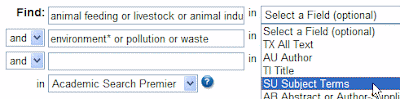
And here is the search with parentheses and the 'subject' tags: SU ( animal feeding or livestock or animal industry ) and SU ( environment* or pollution or waste ). If you click on the link to run it you will see there are over 350 full text articles.
Labels:
Environment,
User Guides
Subscribe to:
Posts (Atom)
